
Menus & Keyboard Shortcuts
Right-clicking on a task, project or area exposes a range of options in a context menu, some of which are only available via the menu system and command palette.
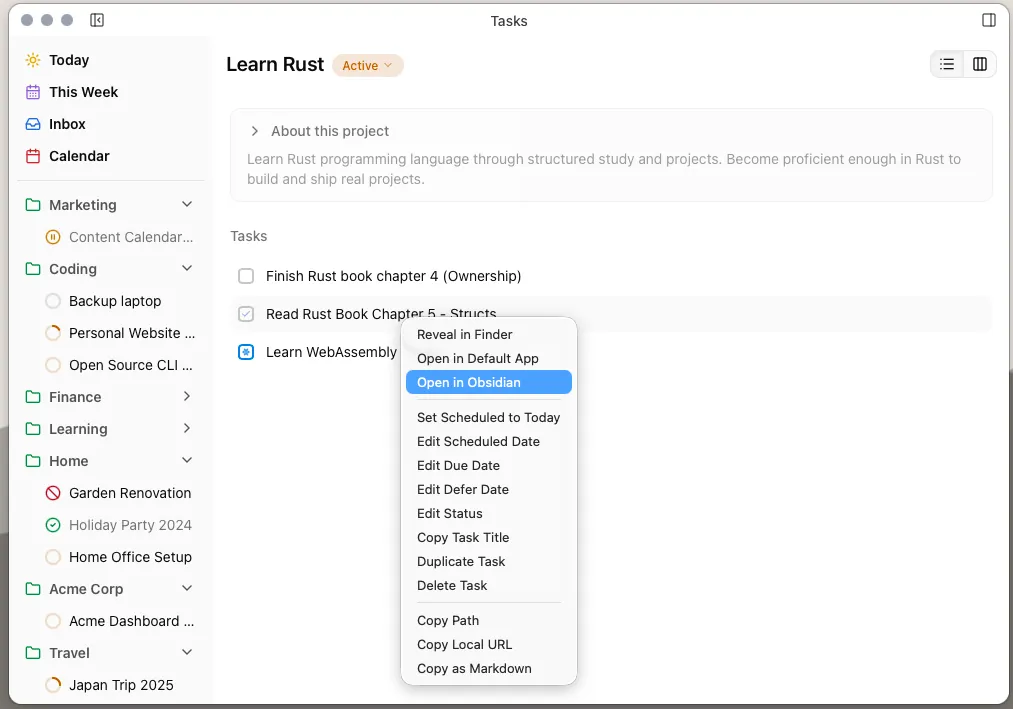
| Menu Item | Available | Description |
|---|---|---|
| Reveal in Finder | All | Opens the file location in your system’s file manager |
| Open in Default App | All | Opens the markdown file in your default .md app |
| Open in Obsidian | All | Opens the file in Obsidian (only visible if Obsidian integration is enabled in Preferences) |
| Copy Path | All | Copies the file’s absolute path |
| Copy Local URL | All | Copies a taskdn:// URL that can be used to open this item |
| Copy as Markdown | All | Copies the raw markdown content of the file |
| Set Scheduled to Today | Tasks | Sets the task’s scheduled date to today |
| Edit Scheduled Date | Tasks | Opens the scheduled date picker in the detail panel |
| Edit Due Date | Tasks | Opens the due date picker in the detail panel |
| Edit Defer Date | Tasks | Opens the defer date picker in the detail panel |
| Edit Status | Tasks | Opens the status picker in the detail panel |
| Copy Task Title | Tasks | Copies the task’s title to the clipboard |
| Duplicate Task | Tasks | Creates a copy of the task |
| Delete Task | Tasks | Moves the task to trash (or permanently deletes based on your preferences) |
Quick Navigation Keyboard Shortcuts
Section titled “Quick Navigation Keyboard Shortcuts”| Shortcut | Description |
|---|---|
Cmd+1 | Toggle left sidebar |
Cmd+2 | Toggle right sidebar |
Cmd+3 | Go to Today view |
Cmd+4 | Go to This Week view |
Cmd+5 | Go to Inbox |
Cmd+6 | Go to Calendar |
Cmd+[ | Go back |
Cmd+] | Go forward |
Task Operation Keyboard Shortcuts
Section titled “Task Operation Keyboard Shortcuts”When a task is selected…
| Shortcut | Description |
|---|---|
Cmd+N | Create new task |
Cmd+T | Set scheduled date to today |
Cmd+D | Edit scheduled date |
Shift+Cmd+D | Edit due date |
Ctrl+Shift+Cmd+D | Edit defer date |
Cmd+S | Edit status |
Cmd+C | Copy task title |
Alt+Cmd+C | Copy file path |
Cmd+' | Duplicate task |
Cmd+Backspace | Delete task |
Cmd+Up | Move task up in list |
Cmd+Down | Move task down in list |
For a complete list of keyboard shortcuts, see the reference:
Keyboard Shortcuts Reference Complete list of all keyboard shortcuts